A Smarter Way to update Facebook Status from Twitter now juts you have to visit this url and Login to your Facebook Account than you can connect your twitter account with it and hence update Facebook from
June 12, 2011

June 11, 2011
Get Windows XP Key From CD Itself
 There is a very interesting way to Garb Windows XP installation Key which is always needed at the time of installation and many of you may
June 10, 2011
How to Find Drivers for Unknown Devices in Windows
 Every time you purchase nay New Device you get Drivers CD packed it for further installation but what if you loose the drivers or CD for that
Download all Freeware Apps for Windows with ZeuAPP
Description .: Zeusoft.net has released an very great application for windows users called ZeuAPP for installing all the freeware's right from their menu at once. This application have different categories in which
June 9, 2011
How to use TCP Optimizer to Optimize Internet Connection
As you all know and for those who don’t have idea about what is TCP Optimizer: TCP Optimizer is a Internet Optimization utility which changes Registry values to improve the speed of your Internet Connection. Now well many of you have used this thing and got a view of satisfaction after using this and let me say this utility really works if configured correctly so today I will tell you how to use and configure TCP Optimizer to get the most out of your Internet Connection.
Follow the Below Steps to Configure TCP Optimizer .:
1. Download TCP Optimizer from Here ( For those who don’t have it )
2. Now if you are on Windows 7 or Vista than you have to open TCP Optimizer as an administrator for it to fully work. For Windows XP and other Os users just simply double click it to open.
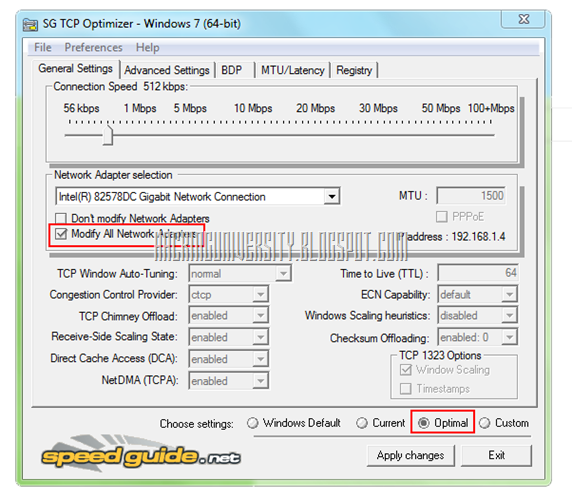
3. Below is the Screen Shot .:

In the above screenshot as you can see that my slider is @ 512 Kbps which is the actual download speed my Broadband Provider is Providing so in this case you have to choose the correct and accurate download speed which you are getting from your Internet Provider so check it and apply it if you are getting 1 mbps than drag the slider to 1 mbps or if are getting below that than you know just drag it below.
4. Now just Tick Modify All Network Adapters and click Optimal Settings. Than just click Apply Changes.
5. After clicking Apply Changes you will get the dialog like below telling you to Backup and Applying Changes Prompt will work after clicking OK so Let the Backup remains Ticked and click OK.
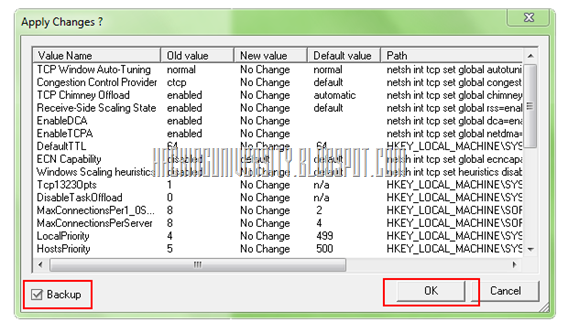
6. Now after clicking OK it will tell you to Reboot the computer so just Reboot for it to take effects. That’s it guyzzz now just check your Internet Speed by going to www.Speedtest.net and well ya you can always check it before applying TCP optimization for checking out the real difference.
Follow the Below Steps to Configure TCP Optimizer .:
1. Download TCP Optimizer from Here ( For those who don’t have it )
2. Now if you are on Windows 7 or Vista than you have to open TCP Optimizer as an administrator for it to fully work. For Windows XP and other Os users just simply double click it to open.
3. Below is the Screen Shot .:
In the above screenshot as you can see that my slider is @ 512 Kbps which is the actual download speed my Broadband Provider is Providing so in this case you have to choose the correct and accurate download speed which you are getting from your Internet Provider so check it and apply it if you are getting 1 mbps than drag the slider to 1 mbps or if are getting below that than you know just drag it below.
4. Now just Tick Modify All Network Adapters and click Optimal Settings. Than just click Apply Changes.
5. After clicking Apply Changes you will get the dialog like below telling you to Backup and Applying Changes Prompt will work after clicking OK so Let the Backup remains Ticked and click OK.
6. Now after clicking OK it will tell you to Reboot the computer so just Reboot for it to take effects. That’s it guyzzz now just check your Internet Speed by going to www.Speedtest.net and well ya you can always check it before applying TCP optimization for checking out the real difference.
7 Facebook Privacy Checking Tools
 There are many cases in which profile is hacked than there are certain problems when hacker claims to be you and messes with your Profile so it
June 8, 2011
Opera Mini for iPad Available for Download
 Opera developer of popular browser Opera Mini for Desktops and other platforms as released an stable iOS version for iPad and iPhone 4 retina
Google Toolbar 7.0.1710.2246
 New version for Google Toolbar is released which contains some more extra features giving you more precise search feature and much
June 7, 2011
File2HD: Website Bulk Downloader
Want to extract all the links from the website and download them all together just use File2HD.com free
Best Cyber Cafe Software
 Upcoming Generation is the Cyber Generation getting Technology Freaks day by day so here is another software for all the cyber café
Subscribe to:
Posts (Atom)